
ClinTools is Composed of Four Major Elements
Effect Size Generator
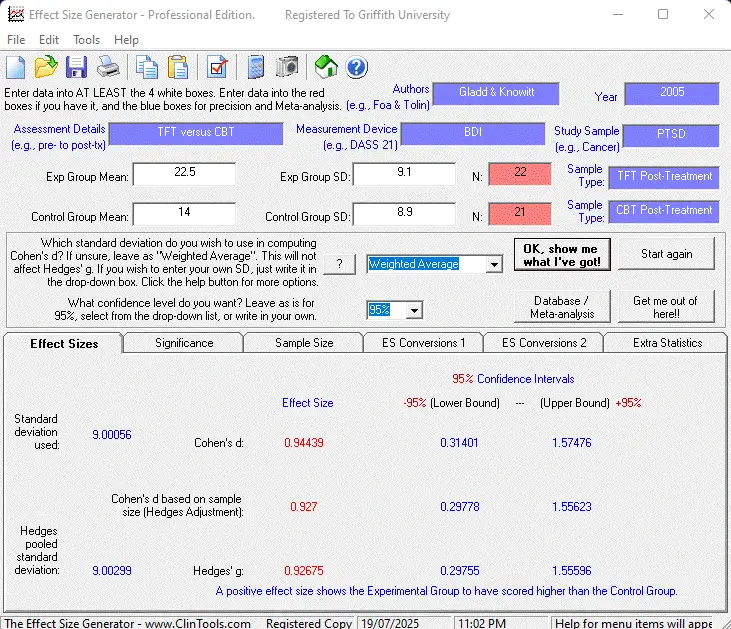
| This programme (or “program” for our American visitors) has two major utilities and a collection of smaller utilities (links are screenshots or example reports in pdf format): |
- It will compute effect size estimates for use in meta-analyses. It will compute Cohen’s d effect size estimates, apply Hedges’ Adjustment for sample size (to Cohen’s d) and also provide Hedges’ ĝ effect size estimate. It will also provide any confidence intervals for these derived effect sizes. It also contains a full help file.
- It will conduct a meta-analysis on effect sizes that have been saved to a database. This includes providing mean effect sizes, standard deviation and 95% confidence intervals of the effect size, z score distributions of the studies included and a suite of Fail-Safe N statistics. Meta-analyses can even be conducted by measure type, and weighted mean (by number of participants) and weighted standard deviations with appropriate 95% cut-offs are also computed.


Other features include the ability to :

- estimate effect size interactions on repeated measure analysis;
- estimate f2 effect size estimates for both multiple and hierarchical regressions;
- obtain any confidence intervals for effect sizes;
- estimate standard deviations;
- conduct t-tests and z-tests on entered data;
- compute confidence intervals around mean (any confidence interval!);
- conduct 2×2, 2×3 and 3×3 Chi Square analyses;
- test for a statistical difference between two correlations, effect sizes or probability levels;
- conduct a priori power analyses;
- convert different statistics to and from effect sizes (e.g., to d and r from chi square, t-test, r, d, ANOVA, Hedges’ ĝ, etc.);
- convert statistical figures (e.g., t-test number) to a probability level;
- export meta-analysis database to Microsoft Excel;
- create meta-analysis report;
- tests of heterogeneity (Q and I-Squared statistics);
- save files and open saved files of raw data;
- generate a printed one page summary report to keep in your records;
- use a built-in screen capture device;
- use an internal calculator.


Key Benefits
- Easy to use interface
- Full complement of analyses performed at the push of a button
- Full help file (including statistical explanations)
- Less than 10% the cost of rival products!
Odds Ratio Generator
| With both Treatment and Control groups (and for improvement and no change, or improvement, no change and deterioration), this programme automatically computes: |


- Event Rates
- Relative Risks
- Relative Risk Increases
- Event Odds
- Odds Ratios
- Absolute Risk Reduction
- Number Needed To Treat
- Number needed To Harm
- Any confidence interval levels for the above
- Chi Square Analysis
- Yates’ Continuity Correction
- Phi / Cramer’s Phi / Pearson’s C
It will also generate a report which can be printed for interpretation of the results and as a hardcopy backup.
Online statistical help for this programme is also available.
Key Benefits
- The only programme which can compute for ‘improved versus unimproved’ groups and also for ‘improved, no change, and deteriorated’ groups.
- The only programme which will compute all of the above statistics with just one click.
- Full help file explanations.

Reliable & Clinical Change Generator
| The Reliable & Clinical Change Generator was developed to help clinicians, researchers and students to assess whether any change apparent in a client (or anything/one for that matter) isn’t just an artefact of measurement. In other words, has someone / something demonstrated reliable and clinically significant change? This computer programme was developed to reduce the time it takes to assess reliable change and facilitate the increased use of this statistic in practice and research. |
You can save files, open saved files and even generate a printed one page summary report to keep in your records.
This was developed following our experiences in teaching university psychology and medical students (many of whom hate statistics with a vengeance) and reading research papers where the authors have made some rather large leaps of faith in whether people “improved” or “worsened” over time.
This programme enables one to:
- Compute reliable change indices with 68.26%, 95% or 99% confidence
- Compute whether there has been change with 68.26%, 95% or 99% confidence
- Compute whether there has been reliable AND clinical change
- Obtain confidence level for specified change scores
- Compute minimum change score for specified confidence level
- Print a report of the outcome
- Save extra client notes / data clarification with the file


Key Benefits
- The only programme available to compute both reliable and clinical change
- The ability to print out reports
- A full help file

Random Number Generator
This programme allows you to compute unique and non-unique random numbers between a given range. To use the software, enter the range of numbers that the random numbers are to be drawn from in the first two boxes. Enter the number of random numbers you desire in the third box and tick the checkbox if the same number can be used more than once (i.e., non-unique). For example: In this picture, we wanted two thousand (2000) random numbers to be drawn between zero (0) and eighty eight (88). As it is impossible to have 2000 unique random numbers for within this range we also ticked that the same number can be used more than once. Keep in mind that the range to be drawn from is inclusive. Therefore, we entered 1 and 87 in the two boxes that stipulate the range.

Key Benefits
- The ability to stipulate starting and ending random numbers
- The ability to stipulate whether the numbers should be ‘unique’ or not
- The ability to select all numbers in a range to be randomly sequenced
- The ability to save the output to notepad and import into statistical software and spreadsheet programmes

All our software is free.
If it works for you, and you can afford it, a donation would be appreciated.